Showing posts with label Tuesday Tip. Show all posts

Monday, April 2, 2012

Tuesday Tip: The Most Bang For Your Buck Out of a Hybrid


You're in the market for a new car, but not sure whether you should make the investment and switch to a hybrid vehicle or not. Ever found yourself in this position? It's no surprise that the price of gas has been skyrocketing (after all, a plethora of factors are at play- rising demand in India and China, tension in Iran, and the transition from winter to spring and summer, which requires a change of fuel. Not surprisingly, this "summer fuel" blend is always more expensive, because it is supposedly better for the environment! NPR even has a pretty interesting article on "the real reason gas is $4")
This is why many people are beginning to turn to hybrids in order to be able to drive their car longer before having to fill back up.

With competition among car makers, the idea of "going green" has started to well, become more green, as far as money savings goes. So when I caught wind of this Cars.com article on the "most affordable hybrids", I was excited to see Toyota topping the list for best subcompact hybrid (Prius C), best midsize hybrid (Prius), family sedan (Camry), and midsize SUV (Highlander Hybrid).
The Prius C has been incredibly popular since it launched, and for good reason. It's the only hybrid on the market that gets 53 miles per gallon with a base sticker price of under $20k! Even if the ads for it are a bit quirky...I'll admit, the first time I saw them, I thought to myself, "Wait...what?"
See the "Game of Life" spot below for yourself and tell me what you think!


As for the full Cars.com list of most affordable hybrids, they include the following:


SUBCOMPACT:  2012 Toyota Prius C – MSRP:  $18,950; 53mpg city / 46mpg highway
Prius C


COMPACT:  2012 Honda Insight – MSRP $18,350; 41mpg city / 44mpg highway
Honda Insight

MIDSIZE: 2012 Toyota Prius – MSRP $24,000; 51mpg city / 48mpg highway


Toyota Prius

FAMILY SEDAN: 2012 Toyota Camry Hybrid – MSRP $25,900; 43mpg city / 39mpg highway
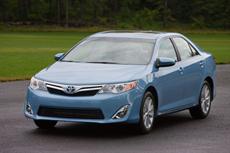
Toyota Camry Hybrid


COMPACT CROSSOVER: 2012 Ford Escape Hybrid – MSRP $30,570; 34mpg city / 31mpg highway

Ford Escape Hybrid


MIDSIZE SUV/CROSSOVER: 2012 Toyota Highlander Hybrid – MSRP $38,540; 28mpg city / 28mpg highway
Toyota Highlander Hybrid

FULLSIZE SUV/CROSSOVER: 2012 Chevrolet Tahoe Hybrid – MSRP: $51,970; 20mpg city / 23mpg highway
Chevrolet Tahoe Hybrid

PICKUP TRUCK: 2012 Chevrolet Silverado Hybrid – MSRP $39,640; 20mpg city / 23mpg highway
Chevrolet Silverado Hybrid

LUXURY SUV:  2012 Lexus RX 450h – MSRP: $45,235; 32mpg city / 28mpg
Lexus 450h


LUXURY CAR:  2012 Infiniti M35h – MSRP: $53,700; 27mpg city / 32mpg highway
Infiniti M35H


Tuesday, January 17, 2012

Tuesday Tip - The Arrow


Sometimes, answers to life's questions can be right in front of you. Literally.

Case in point? I was recently visiting some family out in California, and on the final day of my trip, my aunt decided to borrow my cousin's car to take me back to the airport, since it gets better mileage. As we're driving towards Sacramento International, she mentions how she'll need to stop and get gas soon because the tank was starting to inch towards empty. We're making great time, so I let her know that it's no problem. My aunt then comments on how it's always confusing when driving someone else's car because she can never tell which side of the car has the gas cap.

Fuel gauge


I tell her to glance at her fuel gauge, and point out (no pun intended!) the arrow, showing her which side of the car to pull up to when we get to the gas station. We laughed, and had one of those "The More You Know!" moments. I half expected a fake shooting star to come flying past us.

So, next time you're driving, glance at the fuel gauge and see if you can spot the arrow icon next to the little picture of the gas pump. It is not in every vehicle, so the older your car is, the less likely it will be to have this. However, if worse comes to worse, you can always check your owner's manual to verify!

Tuesday, November 15, 2011

Tuesday Tip: LinkedIn

EDIT: LinkedIn has since gotten rid of the social advertising feature due to all the buzz it generated previously. Now, you can still edit your advertising settings, though once you get to step 3 of this post, you'll have to click a new button called "Manage Advertising Preferences" to do so.

Do you have profiles on Facebook and LinkedIn? If so, and like many, you probably differentiate the two, and use Facebook for personal communication, and LinkedIn more for professional and networking opportunities.
Whereas Facebook openly admits to using your personal information to refer you to friends, advertisements, and other marketing incentives, the policy is not so apparent on LinkedIn. In fact, they may be actively using your name and photo in their ads without you realizing it! With the idea of one's own brand and personal image being incredibly important in today's digital age, having your name associated with anything can be a risk. However, there is an option in your profile settings to allow you to disable LinkedIn from using your likeness or information for social advertising purposes.
To change this, follow the steps below:

1. First, login to your profile, and then find the "Settings" option on the right hand side of the screen.

LinkedIn Settings


2. Next,  click the "Account" button.

LinkedIn Shield Icon


3. You'll then see these options become available. Click "Manage Social Advertising".


4. Finally, deselect the checkbox in order to remove your information from being shared. Voila!